
Payment Tracking
Every payment, every method, one audit trail
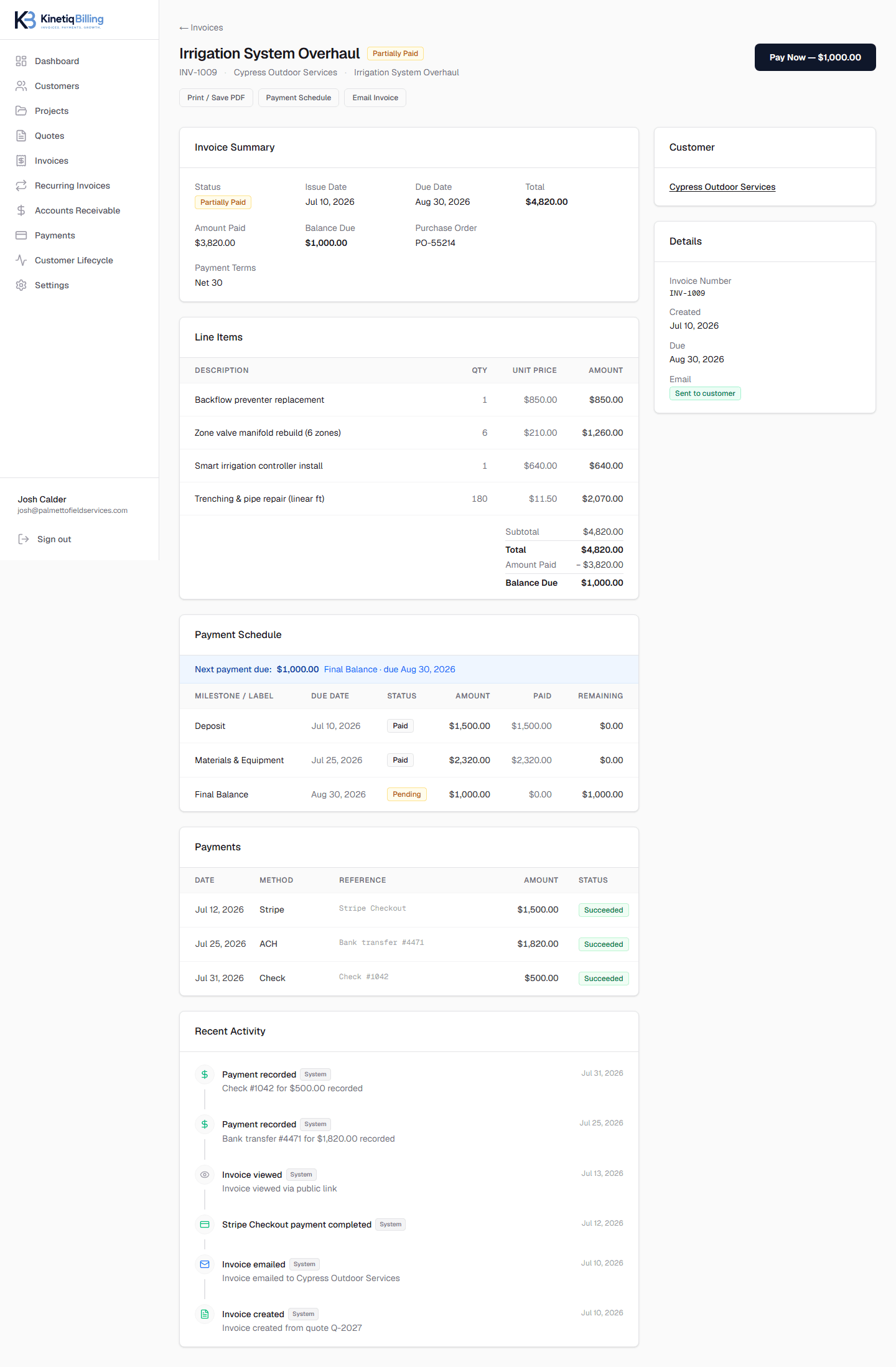
Whether a customer pays through Stripe or you record a check at the counter, it lands in the same audit trail — date, method, amount, and reference — so reconstructing what happened on any invoice takes seconds, not a search through email.
One trail, every method
Stripe payments and manually recorded ones live in the same history per invoice.
Refunds stay accounted for
Refunds tie back to the original payment and update the customer's net paid total.
Reminders before it's overdue
Pro accounts can send payment reminder emails tied to due dates.
How it works
Payment comes in
Online via Stripe, or recorded manually after the fact.
It's logged automatically
Date, method, amount, and reference are captured.
Balance recalculates
The invoice and AR aging update immediately.
Reminders cover the gap
Upcoming and overdue balances can trigger an email.
Deposits, milestones, and a final balance — all on one invoice, with every payment recorded.
Frequently asked questions
Is there a full history of payments against an invoice?+
Yes. Every payment — Stripe or manually recorded — is logged with date, method, and amount, building a complete audit trail for every invoice.
Can I track refunds?+
Yes, refunds are recorded against the original payment and reflected in the invoice balance and customer's net paid total, so your records stay accurate after a refund.
Can KinetiqBilling remind customers about upcoming or overdue payments?+
Yes, Pro plan accounts can send payment reminder emails tied to due dates, so overdue balances get a nudge without you having to track every invoice manually.
Related
Related feature
See every dollar you're owed, in one place
A dedicated accounts receivable workspace with automatic aging buckets, customer-level rollups, and overdue tracking — built for service businesses, not general ledgers.
Related feature
Get paid online without chasing a check
Accept card payments through Stripe Checkout — with Link, Apple Pay, and Google Pay available as part of the checkout experience — plus manual recording for ACH, wire, and cash.
Related article
How to Reduce Late Payments
Reducing late payments means making invoices easy to pay, setting clear terms up front, and following up before a balance goes cold.
Ready to simplify your billing?
KinetiqBilling handles quotes, invoices, receivables, payments, recurring billing, and related workflows, and is currently available by request rather than open signup.